OAuth 2.0 — Clearly Explained (With Real-World Example)
When people first hear about OAuth 2.0, it sounds complex.
But in reality, it solves a very simple and very important problem:
How can one application access user data from another application — without knowing the user’s password?
Let’s break it down step by step.
1. The Problem OAuth 2.0 Solves
❌ The Old (Bad) Way
Imagine this scenario:
- You build a Project Portal
- Users want to import their profile data from a User Profile Service
- The portal needs access to the user’s profile
Naively, you might think:
“Ask the user for their username and password of the Profile Service.”
This is terrible because:
- Your app now stores user passwords.
- If your app is compromised, attackers get passwords.
- Users must trust every app with their credentials.
- You cannot restrict access (all or nothing access).
This model does not scale.
✅ What We Actually Want
We want:
- The user to log in only to the Profile Service
- The Project Portal to get limited access
- No password sharing
- Revocable access
- Scoped permissions
This is exactly what OAuth 2.0 provides.
2. What is OAuth 2.0?
OAuth 2.0 is an authorization framework.
It allows:
A third-party application to obtain limited access to a protected resource on behalf of a user.
It does NOT define login. It defines delegated authorization.
3. Key Roles in OAuth 2.0
Let’s define the actors:
| Role | Meaning |
|---|---|
| Resource Owner | The user |
| Client | The application requesting access (Project Portal) |
| Authorization Server | Issues tokens |
| Resource Server | Hosts protected APIs (User Profile Service) |
4. The Authorization Code Flow (Most Important Flow)
This is the most secure and most common OAuth 2.0 flow.
Used by:
- Web applications
- Backend servers
- Modern secure systems
Let’s walk through it carefully.
🎯 Scenario
- User is on Project Portal
- Clicks: “Import My Profile”
- Portal needs profile data from User Profile Service
5. Step-by-Step: Authorization Code Flow
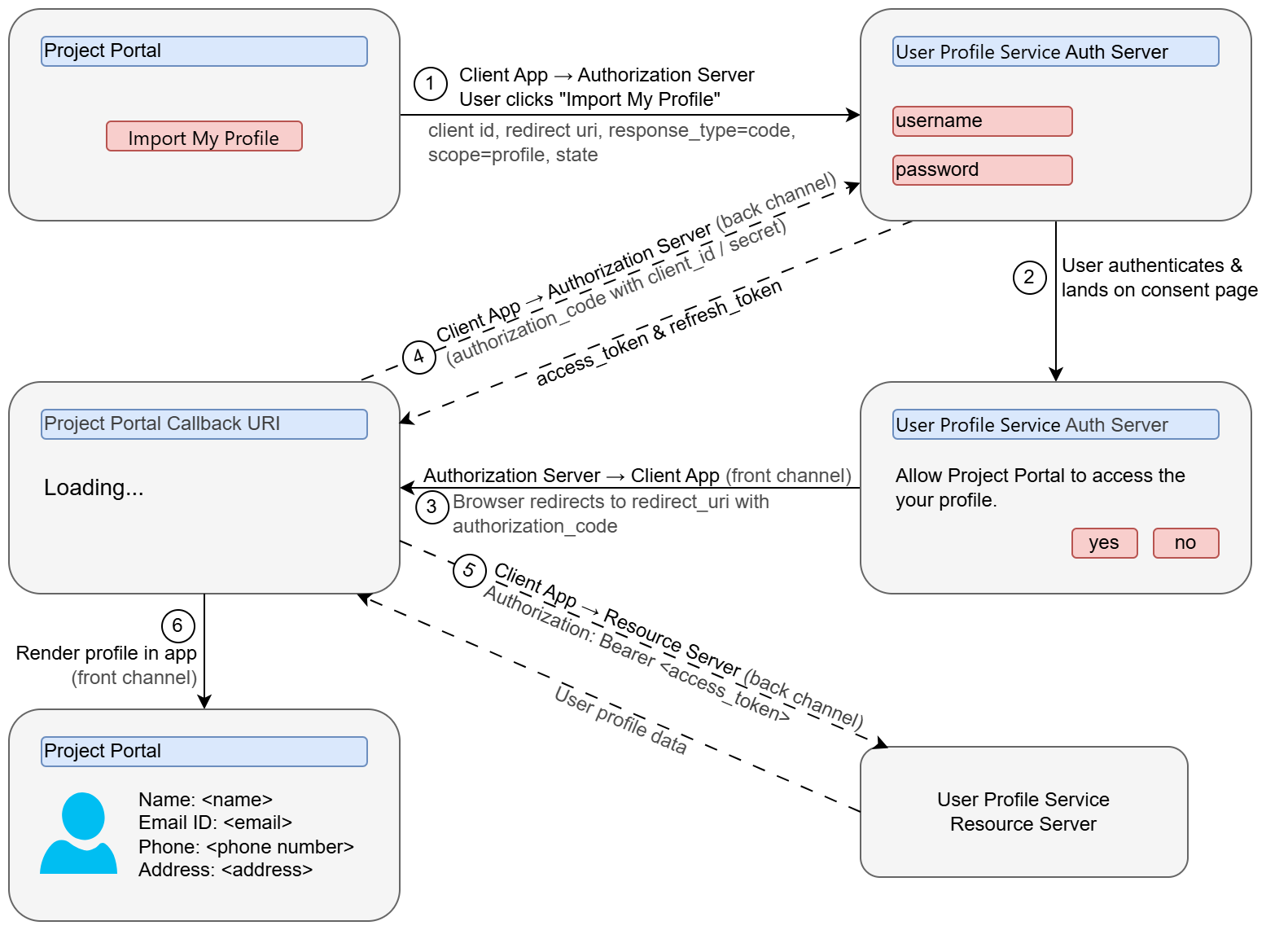
Step 1 — Redirect User to Authorization Server
The client (Project Portal) redirects the user to:
https://auth-server.com/authorize?
  client_id=abc123
  &redirect_uri=https://project-portal.com/callback
  &response_type=code
  &scope=profile
User logs in there.
Important: Login happens on the Authorization Server — not on the client app.
Step 2 — User Grants Permission
User sees:
“Project Portal wants access to your profile.”
User clicks Allow.
Step 3 — Authorization Code Returned
Authorization Server redirects back:
https://project-portal.com/callback?code=XYZ789
Now the client has an authorization code.
But this code cannot access data yet.
Step 4 — Exchange Code for Access Token
Now the client’s backend makes a secure server-to-server call:
POST /token
client_id=abc123
client_secret=supersecret
code=XYZ789
Authorization Server responds:
{
  "access_token": "eyJhbGciOiJIUzI1NiIsInR5cCI6IkpXVCJ9...",
  "expires_in": 3600,
  "refresh_token": "abc.def.ghi"
}
Step 5 — Access Resource Server
Client now calls:
GET /profile
Authorization: Bearer eyJhbGciOiJIUzI1Ni...
Resource Server validates token and returns profile data.
Step 6 — Render profile in app
Project portal frontend renders user's profile on the UI.
6. Detailed Sequence Diagram
The following sequence diagram visualizes the complete OAuth 2.0 Authorization Code Flow from end to end. It illustrates the interaction between all four key roles: the User (Resource Owner), the Project Portal (Client), the Authorization Server, and the Resource Server. This diagram captures the entire flow from the initial user action to the final rendering of profile data, including the critical token exchange that happens securely between the client backend and authorization server.
sequenceDiagram
  box Project Portal
    participant U as User / Browser
    participant B as Backend (Client)
  end
  box User Profile Service
    participant UA as Authorization Server
    participant UR as Resource Server
  end

  Note over U: Already logged into Project Portal

  U->>B: Click "Import My Profile"

  Note over B: No valid access token

  B-->>U: Redirect to Authorization Server

  U->>UA: GET /authorize
  Note over U, UA: client_id, redirect_uri, response_type=code,
scope=profile, state=xyz

  UA-->>U: Login & Consent page

  U->>UA: Authenticate + Approve access

  UA-->>U: Redirect to Project Portal
?code=abc123&state=xyz

  U->>B: Send authorization code

  B->>UA: POST /token
  Note over B,UA: grant_type=authorization_code,
code=abc123, client_id,
client_secret, redirect_uri

  UA-->>B: access_token + refresh_token

  B->>UR: GET /profile
Authorization: Bearer access_token

  UR-->>B: User profile data

  B-->>U: Render profile in app
7. Why Is Authorization Code Flow Secure?
Let’s analyze the security properties.
✅ 1. No Password Sharing
The client never sees the user’s password.
✅ 2. Short-Lived Tokens
Access tokens expire quickly.
✅ 3. Scopes
Client only gets specific permissions.
Example:
scope=profile email
✅ 4. Revocable Access
User can revoke access anytime.
✅ 5. Client Authentication
The token exchange requires:
client_idclient_secret
This prevents token theft misuse.
✅ 6. Backend Token Exchange
The most sensitive step happens server-to-server.
8. Other OAuth 2.0 Grant Types
Authorization Code is the most important one.
But OAuth 2.0 defines other flows:
1. Client Credentials Flow
Used for:
- Machine-to-machine communication
- No user involved
Example:
- Backend service calling another backend
2. Device Code Flow
Used for:
- Smart TVs
- IoT devices
- Devices without browsers
3. Implicit Flow (Deprecated)
Earlier used for:
- Single Page Applications
Now discouraged due to security issues.
4. Resource Owner Password Credentials (Deprecated)
Client collects username & password.
Strongly discouraged.
9. What OAuth 2.0 Does NOT Do
Important teaching point:
OAuth 2.0 is about authorization — not authentication.
It does not define:
- How identity is represented
- How user profile is standardized
- How login tokens should look
This is where OIDC comes in.
10. What OpenID Connect (OIDC) Adds
OpenID Connect (OIDC) is built on top of OAuth 2.0.
It adds:
✅ ID Token (JWT)
A standardized token that contains:
{
  "sub": "12345",
  "email": "[email protected]",
  "name": "John Doe"
}
Now clients can verify:
- Who the user is
- That authentication happened
- When it happened
In Short:
| OAuth 2.0 | OIDC |
|---|---|
| Authorization | Authentication |
| Access Tokens | ID Tokens |
| API Access | User Identity |
🧠 Final Summary
OAuth 2.0 solves a fundamental modern web problem:
How to safely delegate access without sharing passwords.
The Authorization Code Flow is:
- Secure
- Scalable
- Industry standard
- Used by Google, GitHub, Microsoft, etc.
If you understand this flow deeply, you understand 80% of modern authentication systems.